Patron Consent
Once the patron's details and payout information have been collected, ask the patron to sign on the screen to provide consent for the Verification of Identity check. This check confirms that a patron’s ID details match official government records through the Document Verification Service (DVS).
When prompted, hand the device to the patron and ask them to read the statement on the screen before signing in the signature box.
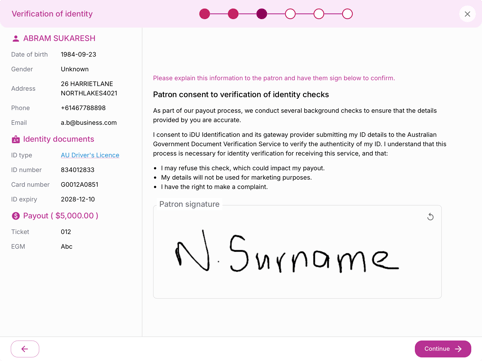
If the patron does not consent, the Verification of Identity check cannot be completed. Follow your venue’s policies and procedures or speak with your Gaming Manager for guidance.
If the payout amount is less than the Know Your Customer (KYC) check threshold amount in Settings, this step is skipped automatically.
Verification of Identity Results
Once the Verification of Identity check has been completed, Checkd will show one of three results:
 |
The patron’s ID details match official government records. Select Continue to progress with the payout |
 |
Collect 100 points of ID to verify the patron’s identity. |
 |
Please check that the ID number and card number were entered correctly and perform the check again if needed. Alternatively, collect 100 points of ID to verify the patron’s identity. |
Collecting 100 Points of ID
If additional documents are required to verify the patron’s identity, select Add identity document, choose the document type, and take a photo of the entire document with the patron’s name clearly visible.
Each document type represents a number of ID points. Once 100 or more points have been collected, you can proceed to the next step.
The exact threshold (how many ID points are required) can be configured in Settings.
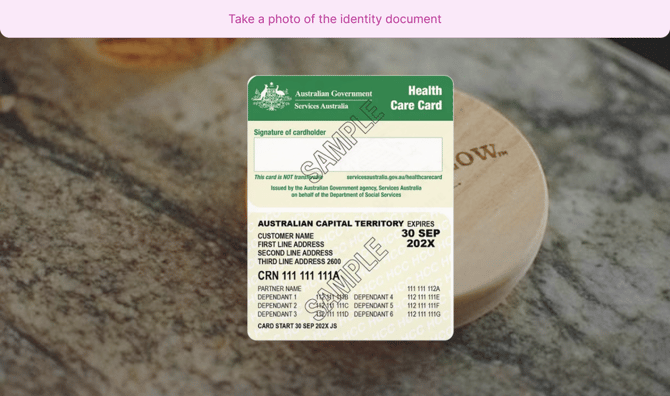
Supported Document Types
| Australian | International |
|
|
If the patron does not have the additional documents required, you can save the payout at any time by selecting X in the top-right corner of the screen. It will be stored in the Drafts section on the dashboard to be completed later.