
A new version of the iDU app has been released to your scanner(s)! This update includes a fix for the 'freezing' bug that occurs when taking a patron photo. Please read on for more information.
'Freezing' bug
After extensive investigation and testing, we determined that the ‘freezing’ bug is related to an Apple update specifically affecting the camera auto focus function on 9th generation iPads. We promptly escalated this matter to Apple upon its discovery, but unfortunately, Apple has yet to provide a resolution or further support. Considering the impact of this issue, we didn’t want to wait for Apple and are pleased to inform you that our team has developed a solution internally.
Version 3.5.4 of the ‘iDU (OS)’ app includes a function to manually set the camera focus depth if needed when taking a patron photo. This fix removes the need to have patrons stand back further from the device, meaning that you can use the scanner again as per usual.
How the 'Advanced Patron Camera' function works
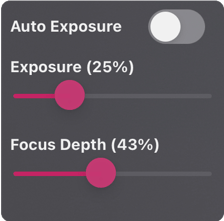
- The panel shown on the left side are visible on-screen while capturing a patron's photo*
- Adjust the slider bars to best suit the lighting conditions at your venue
- The camera settings will remain in place for the duration of scanner use and will only need to be adjusted when lighting conditions change
The ID scanning screen uses a different camera component and is unaffected by the Apple bug. The tap to focus feature is still available on this screen as per usual.
*If you're not using a 9th gen iPad, you can turn this panel OFF in the app settings menu ⚙️
How to get the update
Your device may already have installed the updated ’iDU (OS)’ app version 3.5.4 in the background. Alternatively it may be that you need to wait a minute after unlocking the screen for the app to be installed. If you're using a 4G iPad and the app icon on the home screen displays "Waiting...", you will need to tap on the app icon to initiate the update.
🔐 Please note that you will need to sign in with your iDU Manager Account before you can start scanning.
We sincerely appreciate your patience and support throughout this process. Your feedback and information has been invaluable in guiding us towards this solution.
If you need assistance logging in to your account or require general support, please contact our team at (07) 3053 5401.
Thank you for your understanding and cooperation.
Best regards,
The iDU Team